Powerful computer monitoring program

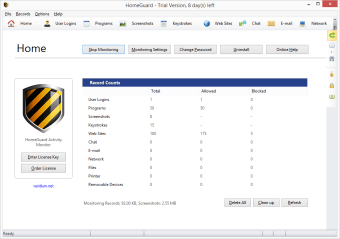
HomeGuard Activity Monitor is a powerful computer monitoring program that can be configured to protect children of all ages.

Top Recommended Alternative

Letting a child use an an internet-connected computer can be nerve wracking. There are certain parts of the internet that aren't appropriate for children. HomeGuard Activity Monitor helps elevate some of those fears with powerful parental controls.

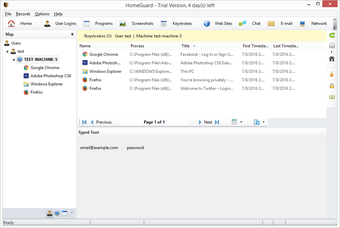
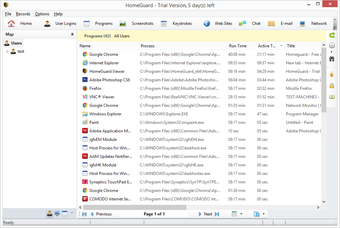
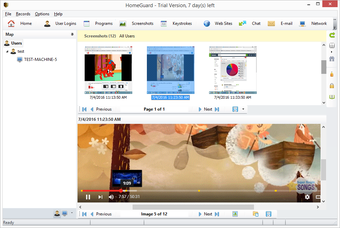
Out of the box, HomeGuard Activity Monitor is massively impressive. It comes with hundreds of blacklisted sites and words, meaning there's no need to create your own blacklist. Alternatively, you can add sites to a white list to be allowed. HomeGuard Activity Monitor keeps an impressively-detailed log of everything that has been done on the computer, including logging keystrokes. Blacklisted websites are blocked automatically and won't load. HomeGuard doesn't warn the user that a site has been blocked.

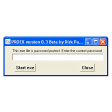
Security is something that HomeGuard Activity Monitor excels at. During installation, you will be required to enter a master password to even access the application. Once installed, HomeGuard Activity Monitor runs quietly in the background. Users will never know that they are being monitored unless specified. The administrator with access to HomeGuard Activity Monitor can also allow certain users to avoid monitoring all together.

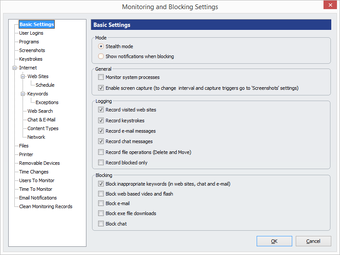
HomeGuard Activity Monitor is packed with features. The features covered in this review barely scratch the surface. Every aspect of computer use can be monitored and controlled. There are even options to control and monitor hardware like USB drives and printers.

Overall, HomeGuard Activity Monitor provides parents an extraordinary amount of control over their child's computer use, much more so than simple web browsers like Weblock for Kids.


  • Pros

    • Email notifications
    • Great control over every monitoring service
    • Email, chat, and hardware monitoring
    • Effective keywoard and site blocking
    • Keylogger
  • Cons

    • Trial only; no free version
 0/6

App specs

Program available in other languages


Icon of program: HomeGuard Activity Monito…

HomeGuard Activity Monitor for PC

  • Trial version
  • 4.5
    199
  • 278.5K
  • V15.0.1

User reviews about HomeGuard Activity Monitor

4.5

2 reviews

Add review

Main reviews for you

  • Anonymous user

    Very good parental control tool.. The exe file download blocking is great because even though I set time restrictions for the kids's favorite games, and they get blocked at the times I choose, they keep downloading new games to play while restrictions are on..blocked exe downloading and that problem is gone.

  • Anonymous user

    Safe and efective. By far the best efective filter for web that I used.Does not bother to much.Mostly all unapropiate webs just do not show, Pros: it works where others do not

More

You may also like

Alternatives to HomeGuard Activity Monitor

Explore Apps

Latest articles

Laws concerning the use of this software vary from country to country. We do not encourage or condone the use of this program if it is in violation of these laws.

Softonic

Is HomeGuard Activity Monitor safe?

96/100

Score result: Warning

This file has been flagged as potentially harmful or containing unwanted bundled software. Please proceed with caution.

  • Virus free
  • Spyware free
  • Malware free
  • Verified by Security Partners

    VirusTotal logo

Scan Info

Last scan
Wednesday, July 17, 2024
Scan provider
VirusTotal · Full report

File Integrity

File
HomeGuard_Activity_Monitor_V15.0.1.exe
SHA256
0b57dd659f5ef25c41d95709057c04582a04713ecd4c0e0e631ef5d339f67f88
SHA1
9bf866b18cae65c39d194893a40dc1d9aa67c5e5

Softonic security notice

This software has been thoroughly scanned by our advanced security systems and verified by industry-leading partners. However, one or more antivirus engines have flagged this software with potential risks. While these detections may be false positives, we recommend caution when downloading and installing. Some programs may include unwanted software or behaviors that could affect your device. False positives can occur when safe software is mistakenly flagged as harmful due to overly cautious detection rules or algorithms in antivirus tools. This means the program may still be safe to use, but we advise reviewing the details before proceeding.